In the previous article, we looked at the companies getting real value from AI. They share one important thing: they build AI into how the company works instead of giving employees a generic productivity tool and hoping for company-wide results.
This raises a fair and practical question – why can’t we just customize a generic AI model for our company? Add some prompts, upload our documents, and connect our systems?
Every major AI vendor nowadays sells some version of this approach. Their pitch is simple: take a powerful model, point it at your data, and you have your enterprise AI.
Customization is a real and useful step. It just covers less ground than many business leaders think it does. Knowing where customization helps and where the work actually begins is what separates the leading companies that build something durable from the ones that restart every year.
The five ways companies customize AI
When someone says, “we’ll customize AI for our company,” they usually mean one of five things.
- Prompt engineering. This is telling the AI who you are and what you want, every time you ask it. Like briefing a smart consultant before each meeting. It works well for individual tasks. However, it gets tiring when you must brief the consultant five times a day for each task.
- Custom GPTs or Copilot agents. This approach saves the briefing in advance, so the AI starts every conversation already knowing your context. Imagine a smart consultant who has read your company handbook once. This is faster than re-briefing, but you’re still working from a single snapshot taken at one moment in time.
- RAG (retrieval-augmented generation). This requires connecting the AI to a folder of your documents. When someone asks a question, the system searches the folder and hands the AI the relevant material to answer from. Imagine a consultant with access to your filing cabinet.
- Fine-tuning. Re-training the model on your company's own content and data, so it adopts your style and terminology by default. Like raising someone inside the company so they absorb your style and terminology. The catch is they know what they grew up with, and nothing after that.
- Connectors and plug-ins. This approach lets the AI pull live data from your internal systems, such as CRM, ERP, or document repositories. Like giving the consultant a login to your systems.
These may sound like five different products. But they all promise the same thing: take a generic AI and make it your company’s AI. Gartner calls this "agent washing", the rebranding of existing products such as AI assistants, automation tools, and chatbots without substantial new capabilities
Where customization genuinely helps
Customization delivers real value. A custom GPT loaded with your style guide produces drafts that sound like your company. A RAG system pointed at your policy library answers routine policy questions faster than searching them by hand. A fine-tuned model speaks your domain’s language with fewer mistakes.
These are real wins, and they matter. They change what the AI says. They make a generic model sound like yours.
The reason so many companies stop at customization is that the early wins are real and they show up fast. You connect a tool, point it at some documents, and the first results feel like the job is done. Then the harder questions start showing up, and the gap between sounding right and being right becomes clear.
Running a company on AI asks for something more. It asks the system to govern how the AI behaves: what it sees, who it answers, what it is cleared to say, and what happens after it says it. That last piece, what happens after the AI produces an answer, is what’s important and where the real work lives. A model will always produce an answer.
Deciding when to answer, when to escalate to a human, and when to hold for review requires rules that the company sets and enforces around the model. The model supplies the answer. The company supplies the judgment.
Example from a Finance department
Picture a finance team that builds a custom GPT for quarterly reporting. They load it with last year’s reporting policies, recent board decks, and a clean chart of accounts. In the first quarter it works well. The analyst drafts variance commentary faster. The controller prepares board talking points with it. The CFO sees the time savings and approves more use cases.
Then Q3 arrives. A finance director reclassified several line items in late August, in a leadership meeting, communicated through an internal memo. The memo was filed. But it was never added to the custom GPT’s document library.
The analyst asks the AI to explain a trend line in the Q3 commentary. The AI gives a fluent, confident explanation based on the old classification. It sounds right, uses the right terminology, and matches the usual format, so the wording moves into the draft board pack. The CFO catches it only in final review. The pack must be redone, and the reclassification becomes an open question in front of the audit committee.
In the above example, the model did exactly what it was built to do. The gap was the layer above it. Nothing in the setup knew the classification had changed, so nothing flagged the answer as built on outdated information.
Here is what changes with an operating layer in place. The system would recognize the August memo as the current authority on those line items, and treat last year’s classification as superseded. When the analyst asked the question, it would answer from the current (updated) source, or flag that the figure depended on a recent reclassification and route it for review before it reached the board pack. Same team, same question, a very different outcome, because the architecture knew what was current and what required a human oversight.
What the operating layer is
The operating layer sits between the AI model and the company’s information. It doesn’t replace the model. It governs how the model works with the business. In practice it does four things.
It knows where trusted information lives. Not just where documents are stored, but which version is current, which source is authoritative, and which material has been superseded.
It knows who is asking. Their role, their permissions, and their decision authority shape both what the AI can see and what it can say in response.
It works inside real workflows. It supports the places where decisions happen, including planning, approvals, reporting, and contract review.
It follows rules. When the AI answers directly, when it escalates to a human, when it holds for review, and when it flags an answer as needing a second look.
This is a layer made of several pieces working together, sitting between the model and the people using it. Customization cannot install this layer, because it is built into how the system works, not added on top of it.
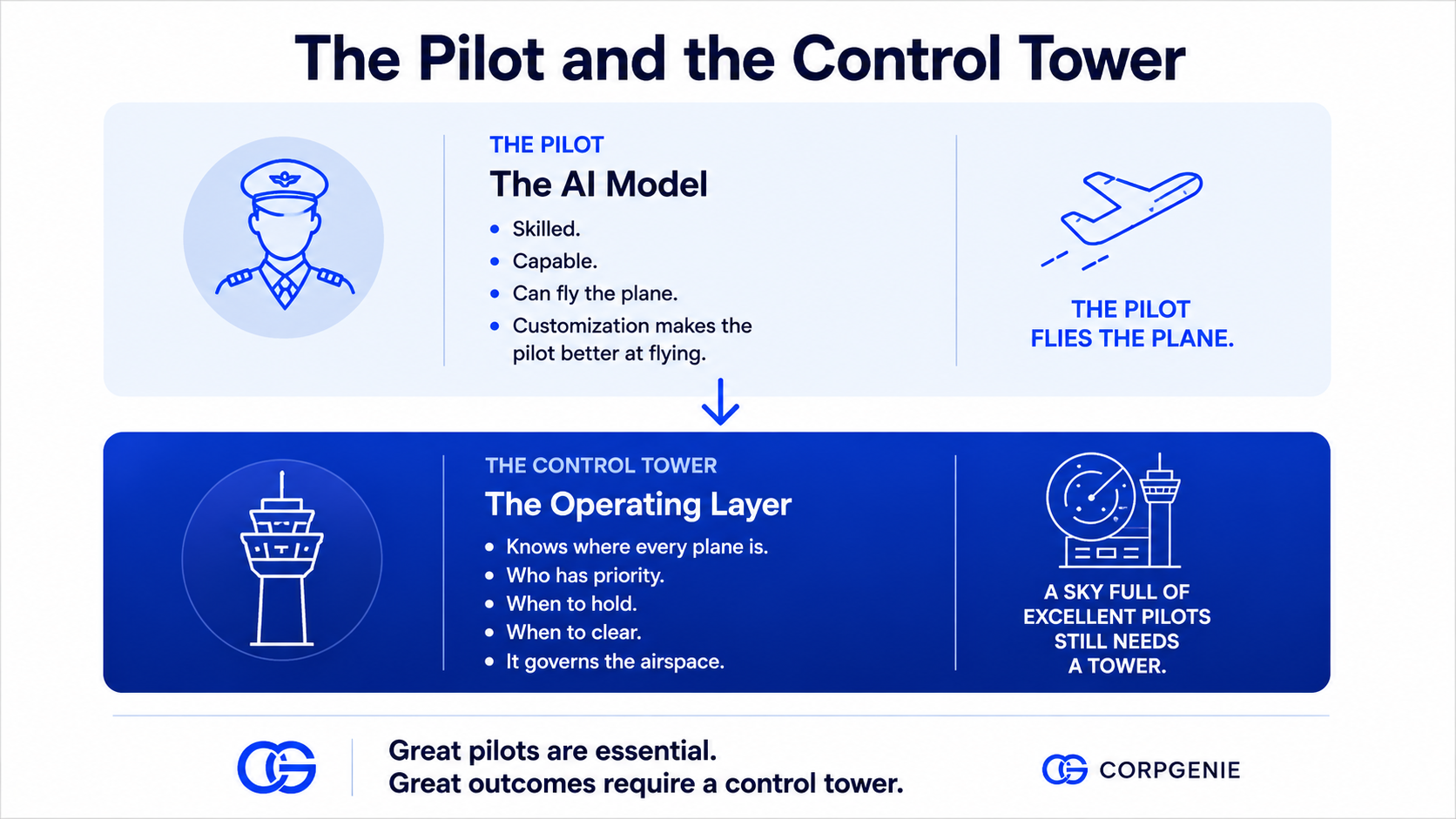
Think about this. Thousands of planes share the same airspace safely not because every pilot is excellent, but because the tower coordinates them all. The pilot flies, but it is the control tower that decides what happens in the airspace. In this analogy, generic AI is the pilot, and the operating layer is the tower. Customization can improve the individual pilot’s flying skills (and that is worth doing); however, it is building the control tower that makes the whole system safe to run a business on.
From customization to architecture
The customization toolkit works. It makes the model sound like your company and answer routine questions faster, and those are real gains worth capturing. But the larger opportunity for companies sits one level deeper, in the operating layer that knows what is current, who is asking, and when to bring a human into the loop.
That is the architecture company-specific AI is built on. The companies that start building it now will have a head start that compounds with every decision their system supports.